Skip to content
BYD OWNERS FORUM
Sign In
  • NAVIGATION
  • Home
  • Categories
  • Popular
  • BYD MODELS & TECH
  • BYD Pickup Trucks & 4x4 BYD Pickup Trucks & 4x4 Off-Road (Shark 6, Denza B5 & Bao Series)
  • BYD Mid-to-Large SUVs BYD Mid-to-Large SUVs (Sealion 6, Seal U DM-i, Sealion 7 & Tang)
  • BYD Compact SUVs & Hatch BYD Compact SUVs & Hatchbacks (Atto 3, Atto 2, Dolphin & Dolphin Mini)
  • BYD Sedans & MPVs BYD Sedans, MPVs & Luxury (Seal, Seal 06 GT, Han, eMax 7 & Denza)
  • Battery, Wallbox & V2L Blade Battery, Home Wallbox Charging & V2L Power
  • DiLink OS, CarPlay & OTA DiLink OS, Apple CarPlay, Android Auto & OTA Updates
  • Maintenance & DIY Fixes Troubleshooting, OBD2 Fault Codes, Maintenance & DIY Repairs
  • Pricing, Finance & Warranty Pricing, Insurance, Finance, Leasing & BYD Warranty
  • Owners Lounge & Road Trips Owners Lounge, Showroom Delivery Photos, Road Trips & V2L Camping
  • BYD News & Future Tech BYD News, Upcoming Models, Blade Battery 2.0 & Future Tech
  • Privacy & Terms
    © 2026 BYD Owners Forum
Skins
  • Light
  • Dark

  • Light
  • Dark
Collapse
  1. Home
  2. Categories
  3. BYD Compact SUVs & Hatch
  4. BYD Dolphin & Dolphin Mini (Atto 1)
  5. Tire Pressure Screen Stuck on Driver Display After OTA Update (Dolphin MY2025)

Tire Pressure Screen Stuck on Driver Display After OTA Update (Dolphin MY2025)

Scheduled Pinned Locked Moved BYD Dolphin & Dolphin Mini (Atto 1)
4 Posts 4 Posters 221 Views 1 Watching
  • Oldest to Newest
  • Newest to Oldest
  • Most Votes
Reply
  • Reply as topic
Log in to reply
This topic has been deleted. Only users with topic management privileges can see it.
  • GavinJohnson_UKG
    GavinJohnson_UKG
    GavinJohnson_UK
    wrote last edited by
    #1

    Tire Pressure Screen Stuck on Driver Display After OTA Update (Dolphin MY2025)

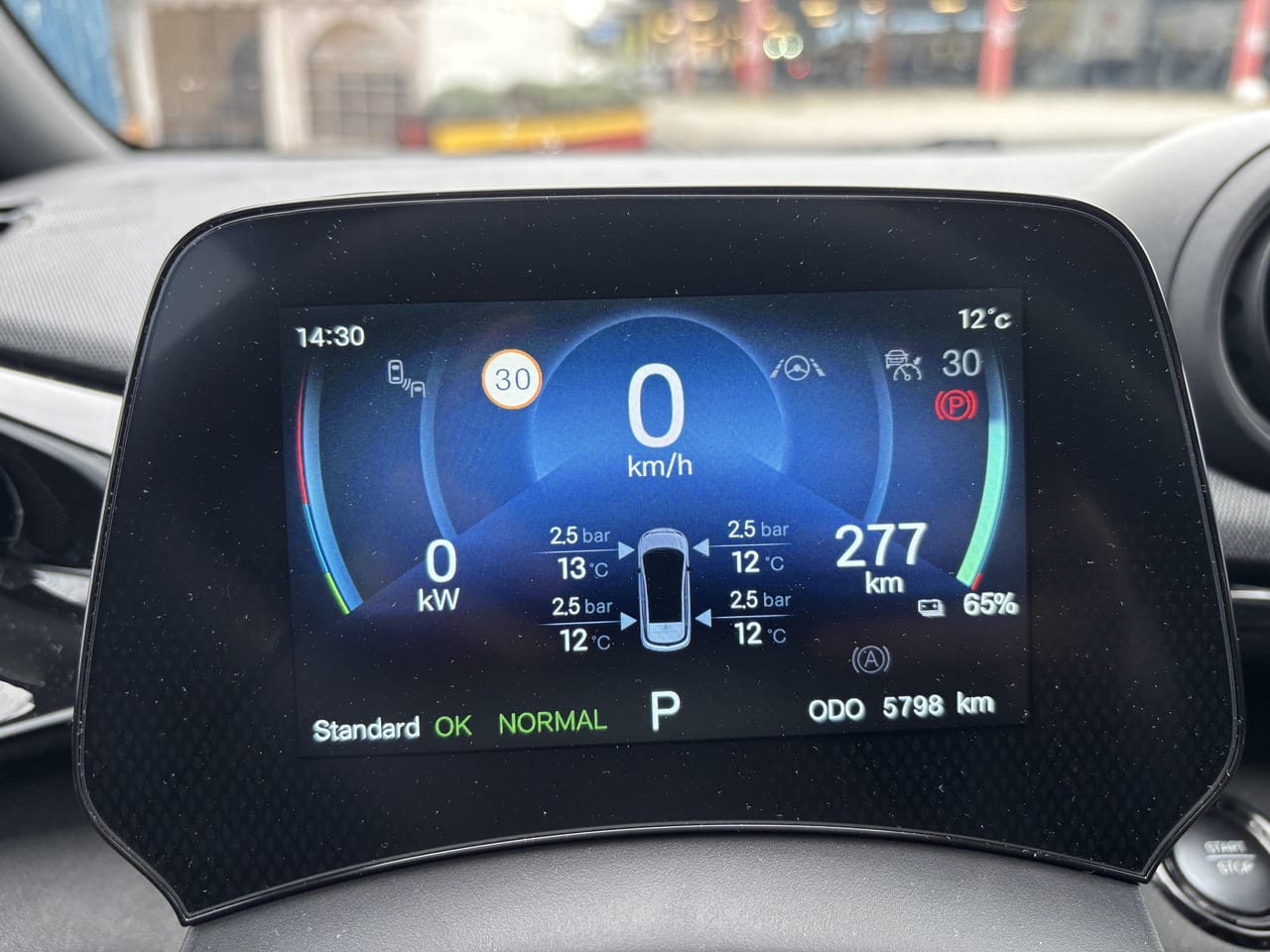
    Hello fellow BYD owners! I drive a 2025 BYD Dolphin, and ever since installing the latest OTA software update, the tire pressure display (TPMS) is permanently shown on my driver dashboard instrument panel.

    Previously, I could cycle through different trip stats and vehicle information displays. Now I can't seem to figure out how to switch back to the main trip meters or standard readout. Has anyone else noticed this issue or figured out how to restore the custom display settings?

    2024 BYD Dolphin Premium • Urban Commuter & V2L • Bristol, UK

    1 Reply Last reply
    0
    • colint78C
      colint78C
      colint78
      wrote last edited by
      #2

      Have you tried pressing the menu button on the right side of the steering wheel, using the scroll wheel to navigate, and then clicking the scroll button to select a new page?

      2024 BYD Dolphin Premium • Urban Commuter & V2L • Bristol, UK

      1 Reply Last reply
      0
      • Matilda_UrbanEVM
        Matilda_UrbanEVM
        Matilda_UrbanEV
        wrote last edited by
        #3

        Yes, that's it! Pressing the menu button cycles through TPMS, trip info, and media modes on the driver display.

        2024 BYD Dolphin Premium • Urban Commuter & V2L • Newcastle, NSW

        1 Reply Last reply
        0
        • A
          A
          ArchieWhite
          wrote last edited by
          #4

          If the menu key doesn't respond right away, hold down the scroll wheel for a couple of seconds to force the sub-menu to clear.

          2024 BYD Dolphin Design — Daily Commuter & Road-Tripper • Melbourne, VIC

          1 Reply Last reply
          0

          Hello! It looks like you're interested in this conversation, but you don't have an account yet.

          Getting fed up of having to scroll through the same posts each visit? When you register for an account, you'll always come back to exactly where you were before, and choose to be notified of new replies (either via email, or push notification). You'll also be able to save bookmarks and upvote posts to show your appreciation to other community members.

          With your input, this post could be even better 💗

          Register Login
          Reply
          • Reply as topic
          Log in to reply
          • Oldest to Newest
          • Newest to Oldest
          • Most Votes


          • First post
            Last post
          0
          • Home
          • Categories
          • Popular